
Painting contractor software that wins the bid and keeps the project on the rails.
Photo-rich estimates from the driveway, milestone billing (30/40/30 or whatever you run), per-room scope tracking, and crew schedules that don't drift. Flat $39/month for the whole shop.
What you get
Photo-rich estimates
Attach reference photos to each line item so the customer knows exactly what they're getting.
Deposits & milestone billing
Collect 30% to start, 40% mid-project, 30% on completion — automated.
Per-job profitability
Materials + hours vs. invoice total. Know which jobs to bid more aggressively.
The pain points we built this to fix
Estimates are 80% of the sale
Walk the house, capture photos, send a polished quote that day. Win more bids.
Deposits hold up the start
Online deposit collection means the job starts when the customer says yes — not when the check clears.
Multi-day projects drift
Track materials, hours, and change orders so a 4-day job doesn't quietly become 7.
Everything included at $39/mo
One flat price. Up to 10 team members. No feature gates, no upsells, no per-tech fees.
Scheduling & dispatch
Drag-and-drop calendar, route view, and crew assignments that sync to the mobile app.
Estimates & invoices
Branded quotes in 90 seconds. One-click convert to invoice with a 'Pay Now' button.
Payments built in
Credit card and ACH at competitive rates. Money in your account in 1–2 business days.
Customer CRM
Full job history, photos, notes, and attachments on every property — searchable from the truck.
Mobile web app (works like native)
Installable on iPhone and Android — add to home screen. Crews update status, capture signatures, and take payment on-site.
Client portal
Customers approve quotes, view invoices, and pay online without calling you back.
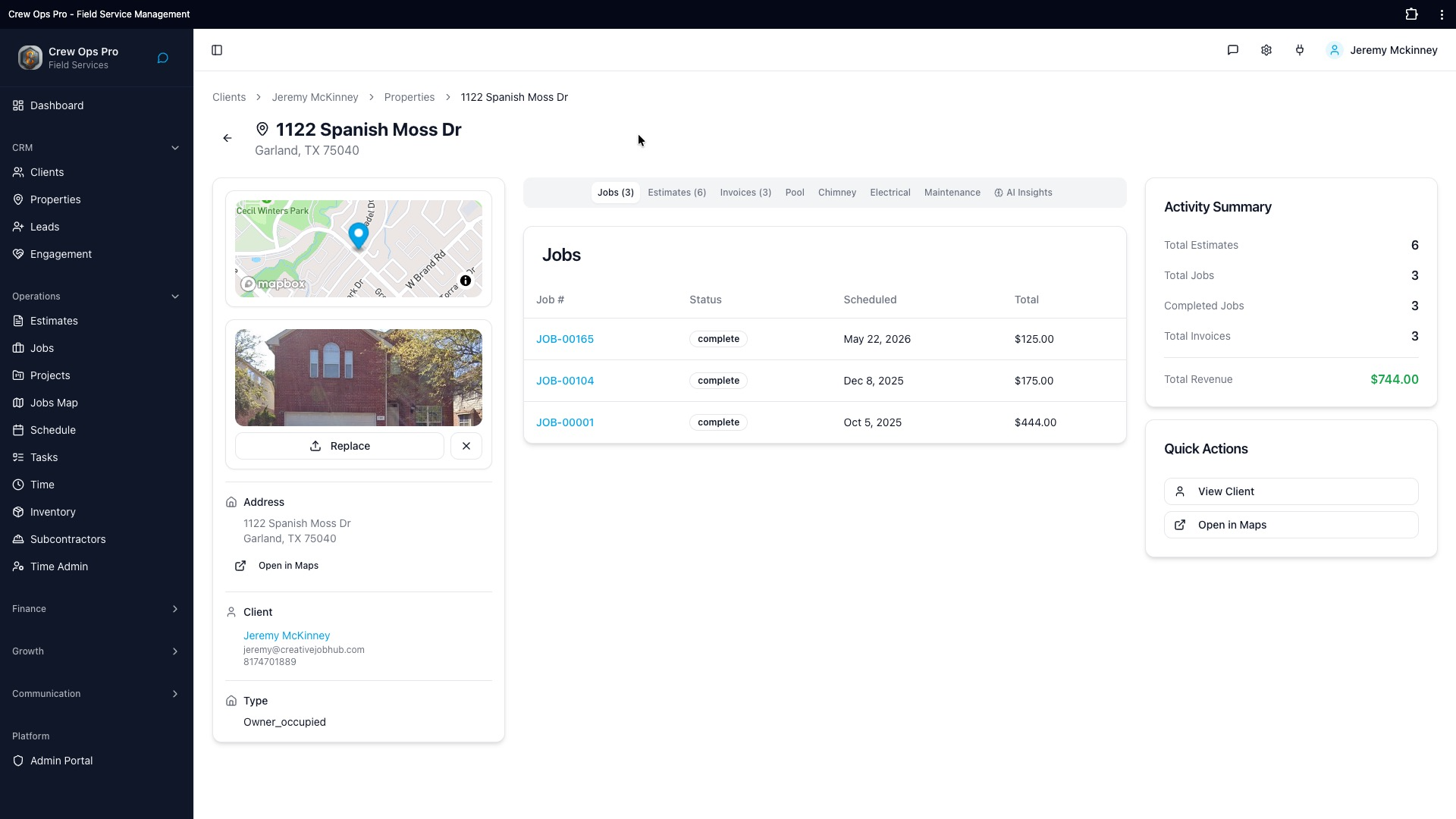
Every property gets its own profile.
Pull up an address and see everything at a glance — every job done, every estimate sent, every invoice paid, with full revenue totals on the right rail. No more digging through email threads or three different apps to remember what you did at 1122 Spanish Moss Dr last spring.
- Jobs, Estimates, and Invoices tabs scoped to the property
- Property photo, map, owner contact, and gate notes in one card
- Activity summary: total estimates, jobs, invoices, lifetime revenue
- Trade-specific tabs: Pool, Chimney, Electrical, Maintenance, AI Insights
Recurring maintenance on autopilot.
Set up recurring service plans per property — quarterly pool service, annual chimney sweep, 5-year panel inspection. CrewOpsPro auto-generates the next job, notifies the customer, and drops it on the right tech's calendar. Predictable recurring revenue without a scheduling coordinator.
AI that predicts the next job.
Every property gets an AI Insights tab that reads its full history — equipment ages, inspection notes, creosote trends, panel condition — and surfaces the next likely service with a suggested timeframe. Stop guessing which customers to call this month; let the data tell you.
"Our close rate on interior repaints jumped from about 35% to over 50% when we started sending the estimate same-day with photos. The follow-up window matters more than the price."
Frequently asked questions
- As detailed as you need — per-room line items, sheen/brand specs (e.g. SW Emerald satin), wall vs. trim vs. ceiling broken out, prep included vs. extra. Photos attach to each line so the customer sees the cracked drywall you're patching.
- Yes. Set milestone percentages on the estimate (deposit / mid-project / completion is the default; customize freely). Each milestone fires an invoice automatically with a 'Pay Now' link, and the job dashboard shows what's collected vs. owed.
- Add a change order line item from the field, customer approves with a signature on their phone, and it rolls into the next milestone invoice. No more 'we never agreed to that' fights two weeks later.
- Yes. Live per-job P&L: paint/materials cost vs. labor hours logged vs. invoiced amount. If a 4-day job hits day 5, you see the margin compress in real time instead of finding out at month-end.
- Yes. Exterior schedules build with weather buffers, interior fills the winter shoulder. Crew assignments respect skill (sprayer-trained vs. brush/roll) so you don't put your apprentice on a stained-cedar exterior.
- Yes — every job carries the color list (paint brand, color code, sheen, quantity used per room). Two years later when the homeowner wants a touch-up, you don't have to guess what was on the wall.
Also serving other trades
CrewOpsPro runs the same flat $39/mo across every field-service trade. A few you might also be curious about:
Handyman Software
Quote the $80 fan install in the driveway, invoice the $4,200 bathroom remodel from the couch, and never lose a sticky note again. Flat $39/month for the whole crew.
ExploreElectrical Contractor Software
Dispatch a breaker swap, track a 200A service upgrade, log a permit number, and bill the homeowner — all without leaving the app. $39/month flat, no per-electrician fees.
ExplorePool Service Software
Drag-and-drop weekly routes, per-pool chemical logs, auto-billed maintenance plans, and a client portal that cuts the 'is my pool getting serviced?' texts. $39/month for the whole route.
ExploreFrom the blog
Industry
Estimating software for painting contractors
What painting contractors need from estimating software — measurement, line items, paint coverage math, and a fast path from walkthrough to signed quote.
Operations
Quoting handyman jobs without losing your shirt
A simple framework for pricing handyman work that covers your costs, makes the homeowner feel taken care of, and still lets you sleep at night.
Operations
Stop chasing invoices: get paid faster
Past-due invoices aren't a customer problem — they're a process problem. Four changes that move money in days, not months.
Run a tighter painting business.
Start your 14-day free trial. No credit card. Be scheduling jobs in 5 minutes.
$39/mo flat · No contracts · Cancel anytime